Parts in your pocket, one tap away.
Find the part you need by name, part number or vehicle; call the business selling it with one tap, message them on WhatsApp or send a message.
The Android version is not available for download right now. You can use the site in your phone's browser.
The iPhone version is not on the App Store yet. On iPhone, you can use CepParça in your browser.

Scan with your phone
Point your camera at the code; this page opens on your phone and shows the right download link for your device.
For part seekers
Find the part and call the business directly. Payment and shipping are between you and the business; no one stands in between.
-
Search in one box
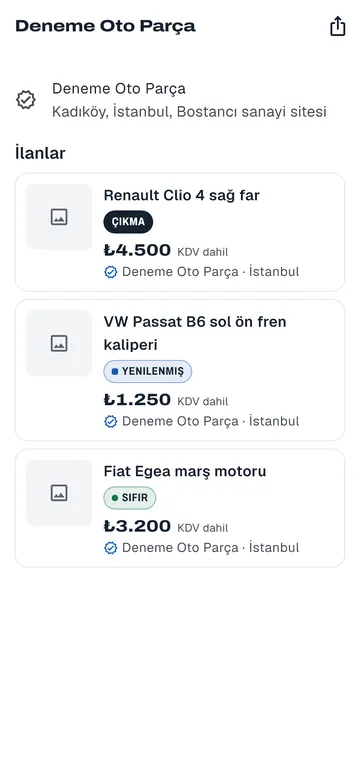
Type the part name, part number or your vehicle in the same box and see matching listings.
-
Call or message on WhatsApp
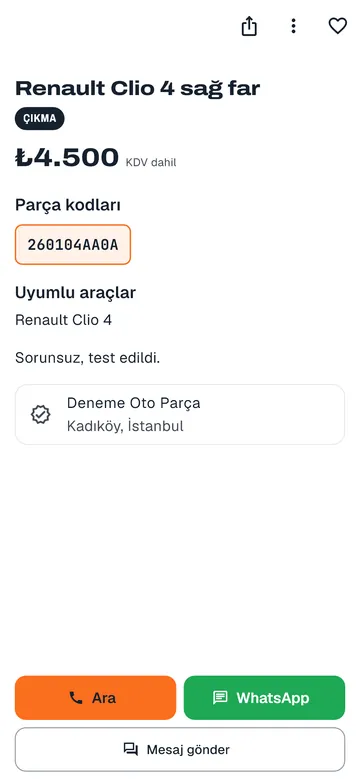
From the listing page, call the business with one tap, message them on WhatsApp or send a message.
-
Verified businesses
See the storefront, address and other parts of a business verified with documents.
-
Favorites
Save a listing you like and get a notification when the business replies.
-
Part alerts
Set an alert for the part number or name of a part you cannot find, and get a notification when a matching listing goes live.
-
Messages
Message the business from the app; your conversations stay in one place.
Frequently asked questions
Do I need an account to use the app?
You do not need an account to search for parts and view listings. To send messages and add favorites, you sign in with your phone number and an SMS code.
Can I buy a part in the app?
No. CepParça is not a marketplace; there is no payment or shipping. You call the business from the app or message them on WhatsApp, and make the deal directly.
What can I do if I cannot find the part I need?
Set an alert for the part number or name; you get a notification when a matching listing goes live.
Where should I download the app?
Only from the links on this page. Do not install setup files shared on other sites.